
Use the AI You Already Pay For
Threadful runs on the AI plans and keys you already have, picks the right model for each job, and moves to another plan when one runs out. Here is how that works, and why we don’t sit in the middle.

In this post
Most people I’d build Threadful for already pay for AI. ChatGPT Plus, Claude Pro, Google AI Pro and Cursor Pro each cost about $20 a month. The last thing anyone needs is another product that resells the same models with a margin on top.
So Threadful works with what you have. On your own plans and keys, it doesn’t sit between you and your AI at all, which means there’s nothing for us to mark up.
Four ways in
There are four kinds of AI you can connect, and you can mix them freely. Every model shares the same chat, memory and project, so switching between them costs nothing.
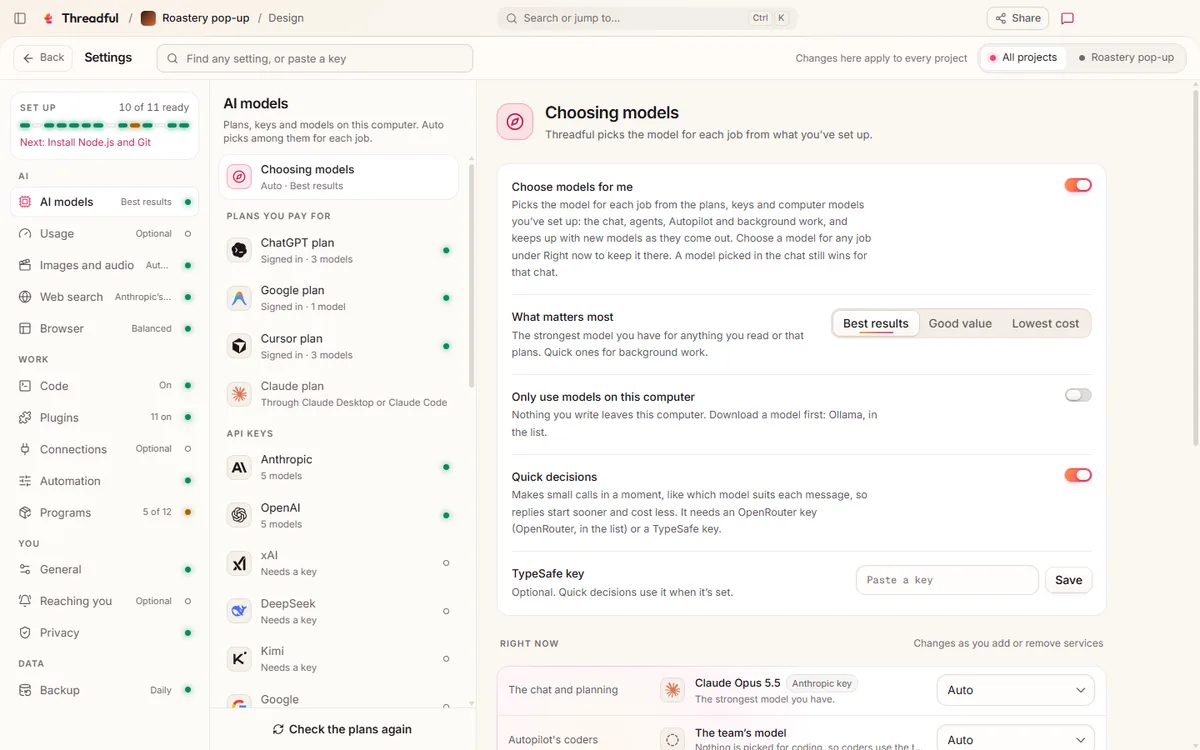
A plan you already pay for. Your ChatGPT plan works through OpenAI’s Codex app, your Google plan through Google’s Antigravity CLI, and your Cursor plan through the Cursor CLI. Threadful installs them if they’re missing and you sign in with your own account. Replies on a plan cost nothing extra. They come out of the subscription you already have.
An API key. Anthropic, OpenAI, xAI, Google, DeepSeek, Mistral and many more, or OpenRouter for hundreds of models with one key. Keys are encrypted on your computer and only ever go to the service they belong to. Paste one into Settings and Threadful recognises most of them by their shape.
A model on your own computer. Threadful can download a model that suits your machine through Ollama and run it for free. Nothing you write leaves the computer.
Threadful credits. If you’d rather not set anything up, credits are AI that comes with Threadful: a unit of hosted use that resets each month. They’re there for convenience, and they’re never required.
The rules we keep
Each AI company has its own rules about other apps, and we follow them to the letter, because the alternative puts your account at risk.
ChatGPT plans reach other apps only through Codex or apps OpenAI approves, so Threadful uses Codex. Google’s terms forbid using an Antigravity sign-in with tools other than Google’s own, so Threadful runs Google’s own Antigravity CLI. And Anthropic doesn’t let other apps use a Claude Pro or Max plan for their replies, so Threadful doesn’t. Your Claude plan still works with it in two ways: Claude Code can do coding runs on your plan, signed in by you in Claude Code itself, and Claude Desktop or Claude Code can connect to your projects and update them. Threadful never sees or uses your Claude sign-in.
You don’t have to pick models
With “Choose models for me” on, Threadful picks the model for each job from what you’ve set up. The strongest goes to the chat and planning, a quick one updates the project in the background, and one that can see reads your pictures. Add a key or sign in to a plan, and it’s used straight away.
You tell it what matters most. Best everywhere gives every job the strongest model. Balanced, where everyone starts, keeps the strongest for the chat, planning and design and uses the models picked for coding, research and chores. Good value puts strong models that cost less first, and Lowest cost puts your plans and your computer first. You can also put one kind of work ahead of the rest, like design and writing or lots of coding. Adjust shows what your choice does for each kind of work, and you can change any of it.
Some models are picked for a kind of work when you have them. These are picks from my own daily use, and they change as the models do:
- Planning, design and the hardest coding: the strongest you have. Claude Opus 5.5 leads today.
- Plenty of ordinary coding, quickly and for less: Grok 4.7, or its Fast version through a Cursor plan.
- Research, and writing people will read: Gemini, through the Google plan first.
- Keeping the project up to date and other background chores: DeepSeek V4, or the quickest model you have.
Some plans give you only a small allowance of their top models, like Cursor’s Claude and GPT models or GPT-6 Astra on the ChatGPT plan. On Good value and Lowest cost, Auto saves those for when it counts.
When a plan runs out
If you use AI all day, you hit limits. This part matters most to me, because I hit them too.
When a service is busy, out of credit or unreachable before it has written anything, another model takes over and you’re told. A reply goes to the cheapest model you have that can still do the work, a plan first, and never to a pricier one unless you’ve asked for that. The reply says what happened, for example “Anthropic was busy, so GPT-6 Sol answered.”
When a plan says its limit is used up, it rests. It rests until the time the plan gave, or for an hour if it didn’t say. Meanwhile, replies on Auto and new coding runs go to your other plans first, and the plan that ran out is used again as soon as it’s back. A coding run that stops because its app hit its limit carries on with another coding app that’s signed in, from where it got to.
The point of all this is that a person with three plans should get the use of all three without managing them by hand.
My own mix
If you’re wondering what I use: I code all day, so my mix is the one the AI plans guide marks as our pick for people who code all day. Cursor Pro handles bulk and backend work on Grok 4.7 Fast, and Claude Max 5× handles design and the hardest pieces on Opus 5.5 in Claude Code. An OpenAI key makes pictures and edits. With the bulk work in Cursor, the Claude plan doesn’t need to be the biggest one.
If you don’t code, your mix will be different and probably smaller. The guide has mixes for people who write, people who build on their own and people who make pictures and video, each with what it gives and the rules that come with it. Every plan there says the day we last checked it, because limits change often and without much notice.
To see how the models compare, the model leaderboard rates every model with a public price for each kind of work, from several open leaderboards together, with what each one costs.
Knowing what it costs
Settings → Usage shows what the models used and what it cost, by day, model and project, and who paid: your keys, your plans or your own computer. You can set a monthly budget for pay-per-use models and watch a ring count it down, with a safe amount to spend each day. A budget is a guide. Nothing stops when you reach it, but you’ll see it coming.
If you want everything on your own computer, one switch keeps the chat, agents, Autopilot and background work on the models you’ve downloaded. Pictures, video and voice wait until you switch it off, since those are made online.
The guide to AI models and keys has every setting. The short version is this: bring what you have, tell Threadful what matters, and let it do the juggling.
