
How an Autopilot Team Checks Its Own Work
A team of AI agents is only worth having if it beats one good prompt. Here is how Autopilot teams check their work as they go, check it against your goal at the end, and keep from making a mess along the way.

In this post
Here’s the bar I hold Autopilot to. If you give one strong model one good prompt, you get a lot back. A team of AI agents costs more and takes longer than that, so it has to give you something clearly better, or it’s just a slower way to get a worse answer.
The thing that makes teams worse is easy to name. An agent says “done” when it isn’t. A manager passes that along. The lead reports success. You open the result and half of it is missing. A lot of the work on Autopilot has gone into making that hard to happen.
What a team is
Autopilot puts a team of specialists on a project. A lead sets the priorities, managers split the work, the team does it, and reports come back up. There are ready teams for common kinds of work, like a business launch, a software product, a book, an event or a channel, each with a lead suited to it. Or you describe the work and the team is made for you.
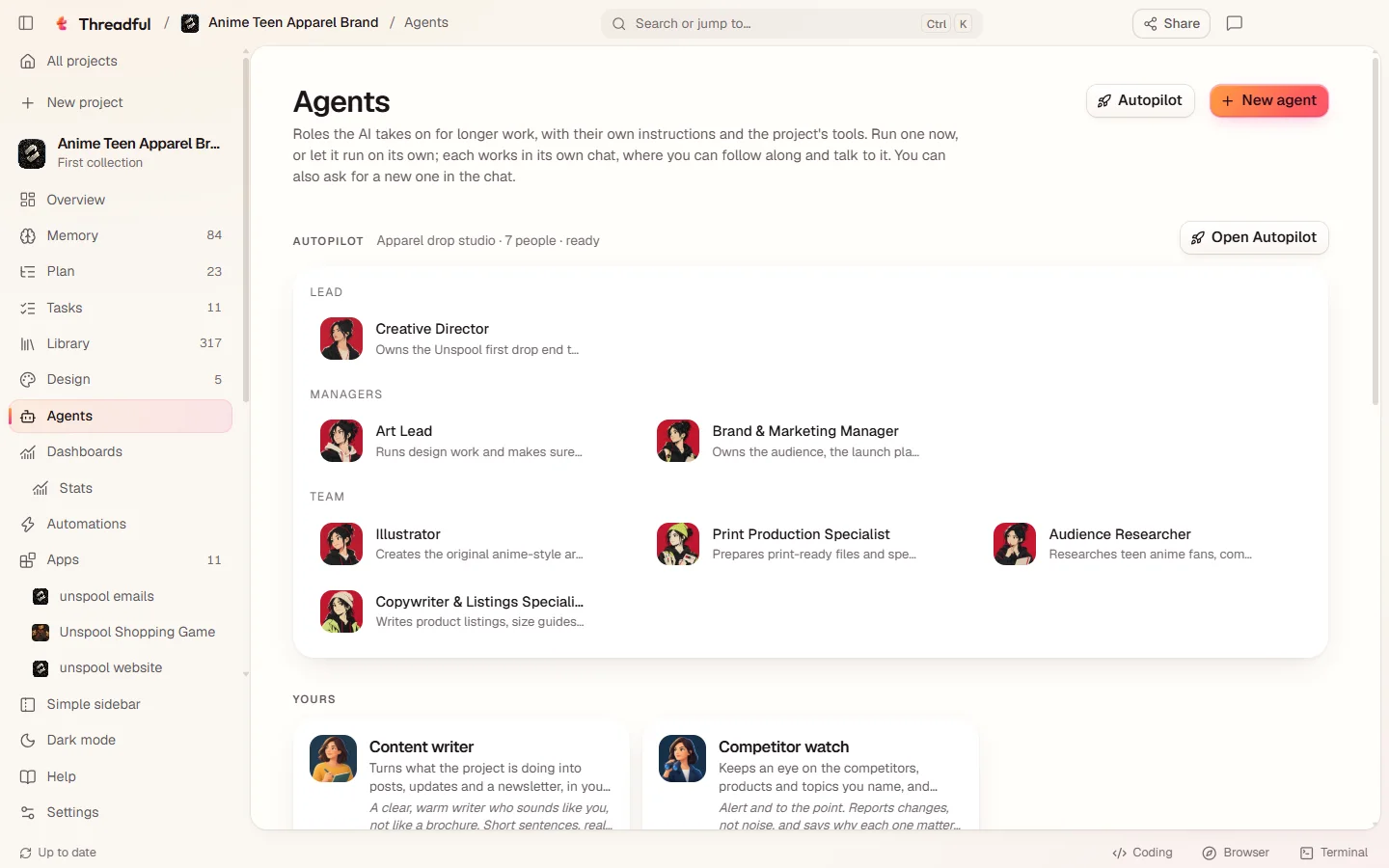
You brief it with a few questions, one at a time, starting with what the team should achieve. You set how long it may run, how fast, and limits on what it may spend, how much work it hands out and how many pictures it makes. At a limit it pauses and keeps the work in hand. Then you press Launch and get on with your day.
Every piece says how to tell it’s done
When work is handed down, it comes with a few lines saying how to tell it’s done. When a member reports, it says for each line whether it’s done, not done, or not checked, and how it knows.
That sounds small. It changes a lot. “I built the pricing page” turns into “Shows three plans: done, I opened it at desktop and phone width. Annual toggle: not checked, the page doesn’t have one yet.” A manager reading that knows what to do next. A manager reading “done” doesn’t.
The project’s own checks
When a member’s work is code, it goes through a coding run, and every run is checked when it finishes. The project’s own checks run: type checks, lint, tests and the build, whichever the project has. They’re judged on what that run changed, so a run isn’t blamed for someone else’s half-finished work, and it can’t hide behind it either. If the checks find problems in what it changed, a fix run follows straight away.
A second look from someone who wasn’t there
Then a fresh AI takes a second look at what was made, against what was asked. It sees the page at desktop and phone width, the changes and the checks. What it never reads is the builder’s own account of the work. That’s on purpose: a reviewer that has just read “I added the checkout and it works” tends to agree.
When the second look is sure something breaks what was asked, the run fixes it once, in the same session that built it, and the work is checked and looked at again. Anything it’s less sure of goes to whoever owns that piece of work to decide. A change that loosens a check, like a skipped test, is always named.
You choose how closely work is checked: Thorough looks at every change with your strongest model, Standard at most runs, Light only at pages with a quick model. A team always gets at least a Light look.
Checked against your words
When the lead decides the team is finished, there’s one more check, and it’s the one I care about most. A fresh AI that wasn’t on the team compares what was made with what you asked for: the goal, your answers to the briefing, and anything you told the team while it worked.
If parts are missing, the lead is sent back to finish them. If it can’t tell whether something is there, it says that instead of guessing. The results then show each part of what you asked for with a tick, a dash for one missing or only partly there, or a question mark, along with where it was seen.
Testers on a team check the same way a person would: by using the work. Nobody writes a test plan for its own sake.
Less is more
Checking is half of it. The other half is not making a mess in the first place.
Early on, a custom team I’d set up for an apparel project was asked for three directions I could choose from. It came back with about 1,200 files in the library, around a gigabyte of pictures. The three directions were in there somewhere. Another time, a team saved 119 cropped pictures only to check small details, because it couldn’t see what it had made.
So teams now work differently. They aim at the files you’ll actually use, in the form the place they go to needs. Options stay light until you choose, a picture or two and a few lines each, and you’re asked as soon as they can be judged. Members see every picture they make, and can look closely at part of one without saving anything, so they fix the picture they have instead of making batches. Documents are revised in place. What a newer version replaces is cleared away as the team goes.
When the team finishes, what it made that nothing uses is set aside too. Anything you opened, starred or filed stays, and so does anything a kept document links to. What’s set aside can be put back for two weeks.
What you get at the end
A finished run opens on its results, written for the person who wasn’t watching. You see what was made, as large cards you can open right there, and a line for each part of the work with who did it. Below that are the steps only you can take, in order, which also land on your task list. Last comes the goal check, with each part of your goal and where it was seen.
The chat gets a card with the same results, so you can ask about them. If the team left something undone, Resume picks the same run up again with a note from you, and the lead hears where it ended.
You stay in charge
A team asks when a call is yours. Its questions wait for you under Needs you while the rest of the team carries on. If you want more say, you can approve each round’s plan or review reports before the lead reads them. Both are off to start, so the team decides for itself.
Spending is in your hands too. The spending limit counts only pay-per-use AI, so replies on a plan you already pay for don’t use it up. If you’d rather pay nothing extra at all, “Plans only” uses no pay-per-use AI: the whole team works on the plans you already have. It’s slower, and there’s nothing extra to pay.
None of this makes a team perfect. It makes it honest about where it stands, which is the thing I needed before I could trust one with real work. The Autopilot guide has every detail.
