
A Tour of the Studios
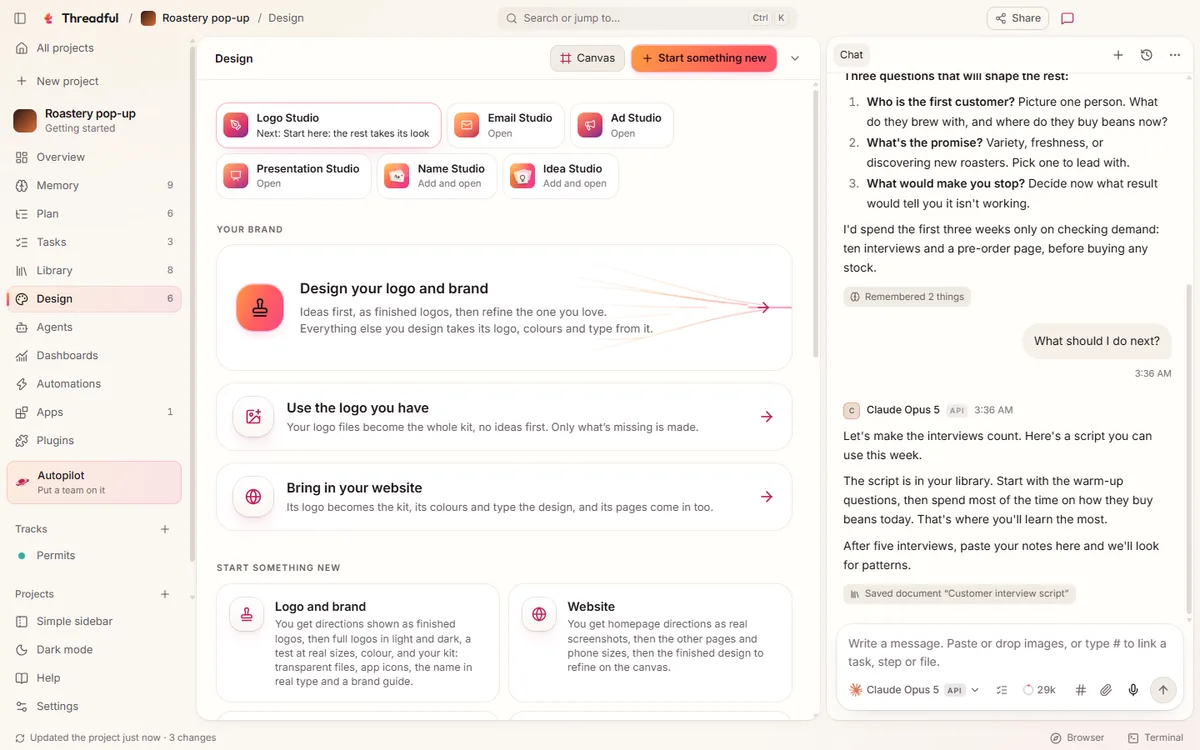
Every studio in Threadful works the same way, ideas shown finished and then refined with you, and all of them work from one brand. Here is what each one makes, from the logo to the emails.

In this post
When I made the Threadful logo, it happened in a chat. I’d ask for a direction, look at it as a finished picture, say what I liked and what I didn’t, and ask again. Wide at first, then narrower. I never once had to describe the logo I wanted in the abstract. I only had to react.
Reacting is much easier than describing. Almost nobody can write a good brief for a logo, but everyone can point at the one they like. So every studio in Threadful is built around that.
One way of working
Whatever you’re making, the steps are the same: Brief, Ideas, Refine and Final.
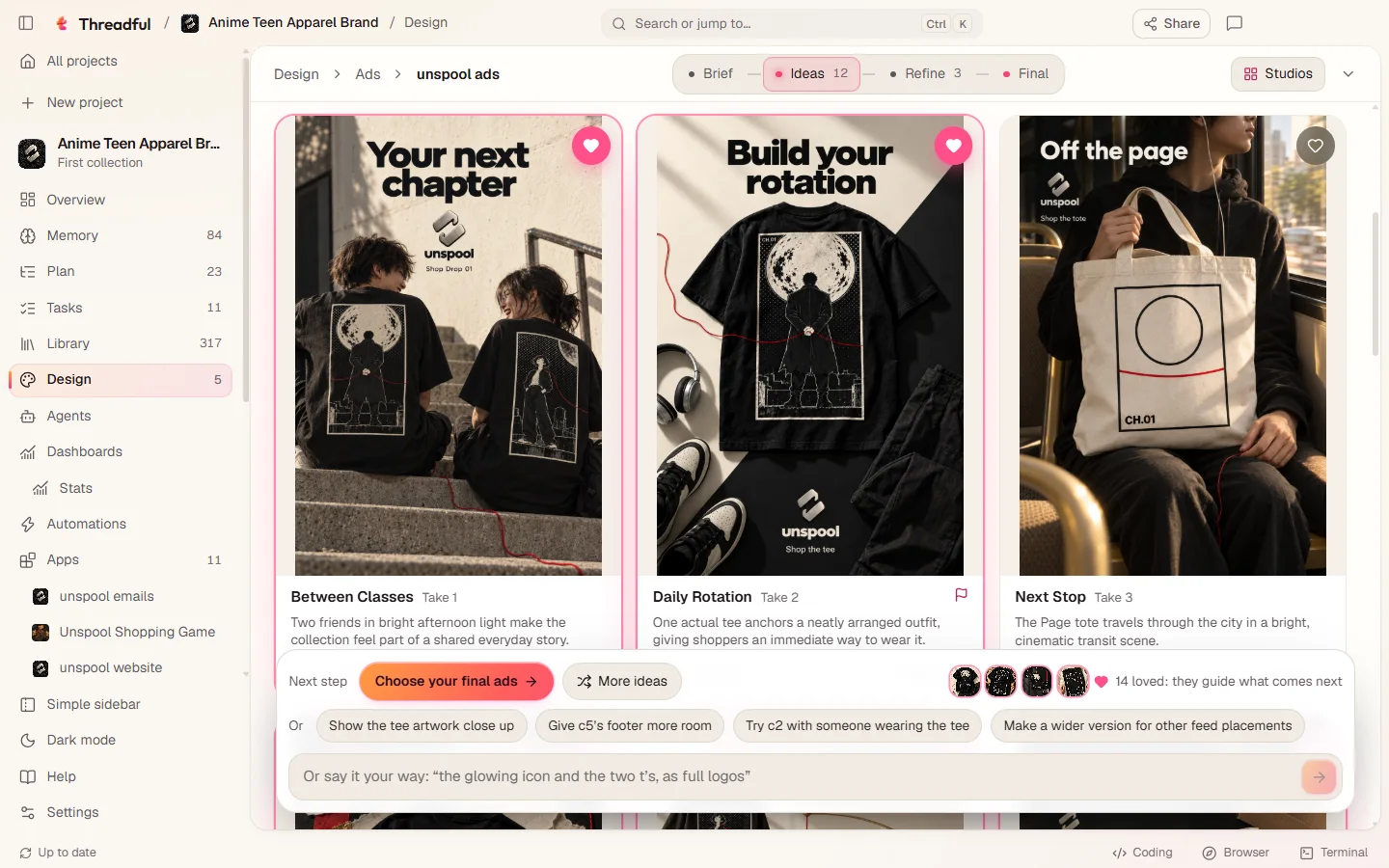
The brief is a sentence and two short questions, filled in from what the project already knows. Ideas come back as finished pictures, not sketches: a logo as a polished app icon, a website as a real screenshot, an ad as people would see it in their feed. You heart the ones you like and ask for more as often as you want. Refining goes in rounds, made from what you loved, and each round changes only what you asked for. Then you choose, and the studio makes the real thing.
The studio also gives its own opinion as it goes. Each batch says which one it would pick and why, and flags anything to check on a picture, like a name spelled wrong. You can ignore it, but it catches things.
One brand under all of it
The studios share one brand. Once your logo is final, its colours and type become the project’s design, and the websites, emails, ads and slides you make afterwards start from them. Change a colour later and every website and email in that brand follows. A project can have more than one brand too, for a product or a client of its own, and each new design can be in whichever you like.
Logo Studio
Logo Studio is where most projects start. Six directions as finished logos, most in two takes. You refine the ones you love: full logos, real sizes, other colours, or what you say in your own words. Brand cards show it on light and dark, as an app icon and small, which is the best test before you choose.
The kit has every file a brand needs: logos for light and dark backgrounds, the app icon at every size down to 16 pixels with a favicon, versions in one colour and reversed, SVG files and a one-page brand guide. Each file is checked to make sure it actually shows on the background it’s made for. If you already have a logo, “Use the logo you have” makes the kit from your files without the ideas.
Website Studio
Website Studio shows website ideas as finished homepage screenshots, then builds the one you choose into a real website: a header and footer on every page, its sections, its pages and its pictures. You change it by clicking on it, or by saying what to change, and you publish it to your own address. I wrote the whole path up in From an Idea to a Live Website in an Afternoon.
Ad Studio
In Ad Studio you pick where an ad will run first: Instagram and Facebook, TikTok, Google or LinkedIn. The ideas are finished ads. When you choose one, you get it in every size each place takes, laid out again for each one and cut to the exact pixels, plus three sets of words with anything too long flagged. You can add a story of three, five or seven pictures, a video made three different ways, and a pack for each platform with everything named the way it expects.
If you’d like, it can run the ads too, on Instagram and Facebook, TikTok and Google. Nothing is spent until you press Start. While the app is open it reads how each campaign is doing every 15 minutes, and it never goes over your monthly limit. You choose how much it does by itself. It can only suggest changes, or move money to what works on its own, and a raise past what you allowed always asks you first. The running ads guide covers it.
Email Studio
Email Studio is about what happens after someone signs up, gets in touch or buys. “Let AI build your flows” makes the ones that fit your business, like a welcome series or a thank-you for an order, as drafts with their emails written in your brand. Nothing sends until you turn it on. When you do, your own website sends them through your own Resend account, from your own address, and keeps your list in your own database. It works with the app closed.
Video and slides
Video Studio treats a video like any other design. The ideas are finished stills from it. Choose one, and three to six shots are planned, each picture made in the same look, brought to life and joined into one video, tall for Reels and TikTok or wide for everything else.
Presentation Studio designs a look for your slides the way Logo Studio designs a logo, or uses your project’s design as it is. Decks are then written in it from what the project knows, with speaker notes and pictures for the slides that need one. They go out as PowerPoint with every word still editable, as a PDF, or as a web page that presents itself.
Writing Studio
Writing Studio is for words: a blog post, a newsletter, a proposal, a page for your site. You get help when you ask, every change is shown for you to keep or undo, and the words the AI wrote are marked apart from yours. Any writing, yours or the AI’s, can also be made to sound like a person wrote it. That works by fixing the habits that make text read as AI and asking you for real details where they’d help, never by making things up. I’d never sell it as a way to hide that AI helped, and its Word and PDF downloads say so in their properties when AI helped write them.
The ready-made studios
Three more are apps that a project adds the first time you open them. Name Studio shows every name as a small branded card and checks the domains when you ask. Idea Studio brainstorms with eleven real techniques and turns the best ideas into tasks. Spreadsheet Studio makes a budget or a tracker from a sentence, with formulas, charts and a real Excel file.
Putting it all out at once
Once your brand is final, the Design page has a button called Launch it. It makes what a brand needs to go out, one part after another: a website of three pages (published when your Vercel account is signed in), a launch deck, social posts at the sizes their places take, and a welcome email. It asks first, since it makes pictures, and you can change any of it afterwards.
“Put it on more things” does the rest at your pace: business cards and letterheads in real type at print size, social posts, merch, signs and app screens, each ready for where it goes.
What you need
The studios need an AI model and something to make pictures with. That can be Threadful credits, your own OpenAI or Google key, a Higgsfield plan, or another picture service. If nothing is set up, the studio says so in place and offers the quickest way to get going.
Ideas stay in the studio and don’t fill up your library. What you heart and what you make final goes there by itself.
The studios page has every studio in more detail, with real pictures. Or open the Design page in the app and try one. Logo Studio is a good first afternoon.
