
Why I Built Threadful
My work lived in forty chat tabs. Threadful is the tool I wanted instead: talk an idea through once, with any AI, and the project keeps itself while the work gets done.

In this post
For a long time my best thinking happened in chat windows. I’d work out a launch plan with one model, a pricing question with another, and the words for a landing page with a third. Some of those conversations were the best work I did all week.
Then they were gone. Nothing was deleted. It was buried. A decision I’d made one day sat in a tab I’d closed the next. The plan I’d agreed with myself was in a chat that had long since scrolled past it. At one point my work lived in forty chat tabs.
The work around the thinking
The models were never the problem. They were good at thinking with me. What wore me down was everything around the thinking.
I was the one copying a plan out of a chat into a to-do list at midnight. I was the one explaining the whole project again, from the start, each time I opened a new chat or tried a different model. I spent real time hunting for a file I’d made days earlier, or for the reason we picked one name over another. And once the AI had helped me write the plan, I did every step of it by hand.
I was using AI the way you’d use a brilliant stranger. Every conversation started from zero, and I was the only thing that carried over.
One project, any model
Threadful is the tool I wanted. You make a project for something you’re working on, a business or a website or a book or a kitchen you’re redoing, and you talk it through in the project’s chat. Any model you like answers, and you can change models from one message to the next. They all share the same chat, the same memory and the same project, so the next model starts where the last one stopped.
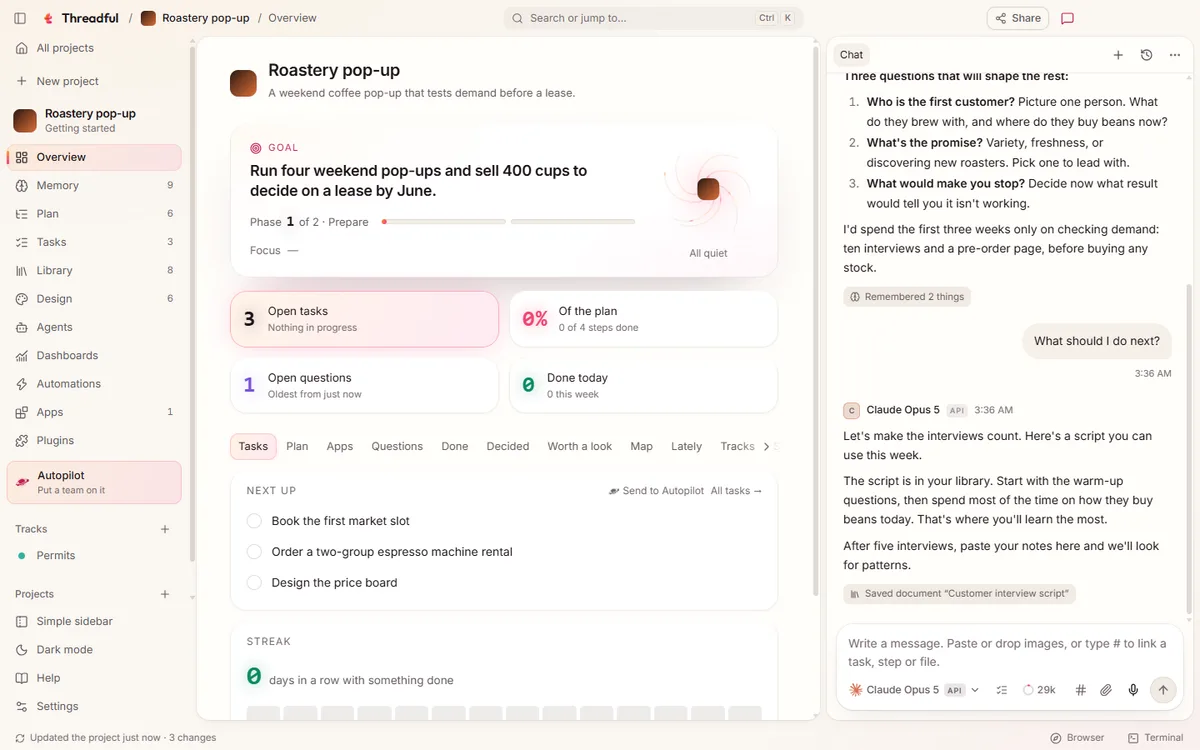
After each reply, Threadful brings the project up to date by itself. The goal, the plan, the tasks and what the project knows (decisions, ideas, open questions, facts) are kept in step with what was said. The status bar says what changed. A reply that changed something has a short list under it, each item one click from opening, with Undo beside it. I don’t copy plans into to-do lists any more. The task is there when the reply ends.
That project is also what every model reads before it answers. So I don’t explain myself again. I say what’s new, and the model already knows the goal, what we decided last week and what’s waiting on me.
Old chats come along too. Threadful finds chats from Claude Code, Cursor and Codex on your computer, brings in exports from ChatGPT, Claude and Gemini, and remembers what they decided. The guide to projects shows how.
Why threads
The logo is a ribbon of three strands, amber, coral and magenta, coming together. That’s the whole idea, and it’s where the name came from. A project starts as loose threads: a chat here, a screenshot there, a file you downloaded, a thought you had on a walk. Threadful’s job is to gather them into one thing you can see at a glance and pick up again tomorrow.
When you look at a project, you should see where it stands in a few seconds. The goal at the top. How far the plan has got. What needs you. What’s running. Everything else is a click away, but it doesn’t shout.
Then the work gets done
A plan only matters once it turns into work, so the second half of Threadful is doing it.
Agents take on a role and a job, by hand or on a schedule, like a morning brief or a bug fixer. Autopilot puts a whole team on a goal. A lead sets the priorities, managers split the work, and reports come back up while you get on with your day.
The studios make the things a project needs in its own brand. You get a logo with every file a brand needs, then a real website, ads in every size, emails that send themselves and slides for the pitch. Coding runs hand a task to Codex, Cursor, Claude Code or another coding app you already use, then check the work themselves before telling you it’s done.
None of that means it runs off without you. I keep the calls that are mine, and so do you. When something needs a decision, Threadful asks and waits for the answer instead of guessing. An agent on a website asks before it buys or posts anything. A coding run on your plan can’t push your code or deploy your site: it finishes the rest and leaves that step to you.
What I decided early
A few things were settled before anything else, and I haven’t changed my mind on them.
Your work lives on your computer. Projects, chats, files and keys stay there. Our servers keep an account, not your work. There’s more on that in Your Work Stays on Your Computer.
You choose the AI. Use the plans you already pay for, your own API keys, or a free model on your own machine. Threadful offers its own credits for people who’d rather not set anything up, but it never makes you buy AI from us. Use the AI You Already Pay For explains how that works.
Finished beats drafted. A plan in a document is a start. The point is the website that’s live, the logo files in every size and the code that passes its checks.
You’re the pilot. Threadful plans the work, does it and revises it. You decide what’s worth doing.
Where it is
Threadful is young, and it has rough edges. I use it every day for my own work, which is how most of those edges get found. If you try it and something feels off, write to me at hello@threadful.ai. I read what comes in.
The guide is the best place to see how it works, page by page. On this blog I’ll explain the parts I care about most, one at a time.
