
The Map shows what's in Memory around the goal, so you can see the shape of the project at a glance. Open Memory in the sidebar and choose Map at the top (or press Ctrl 2).
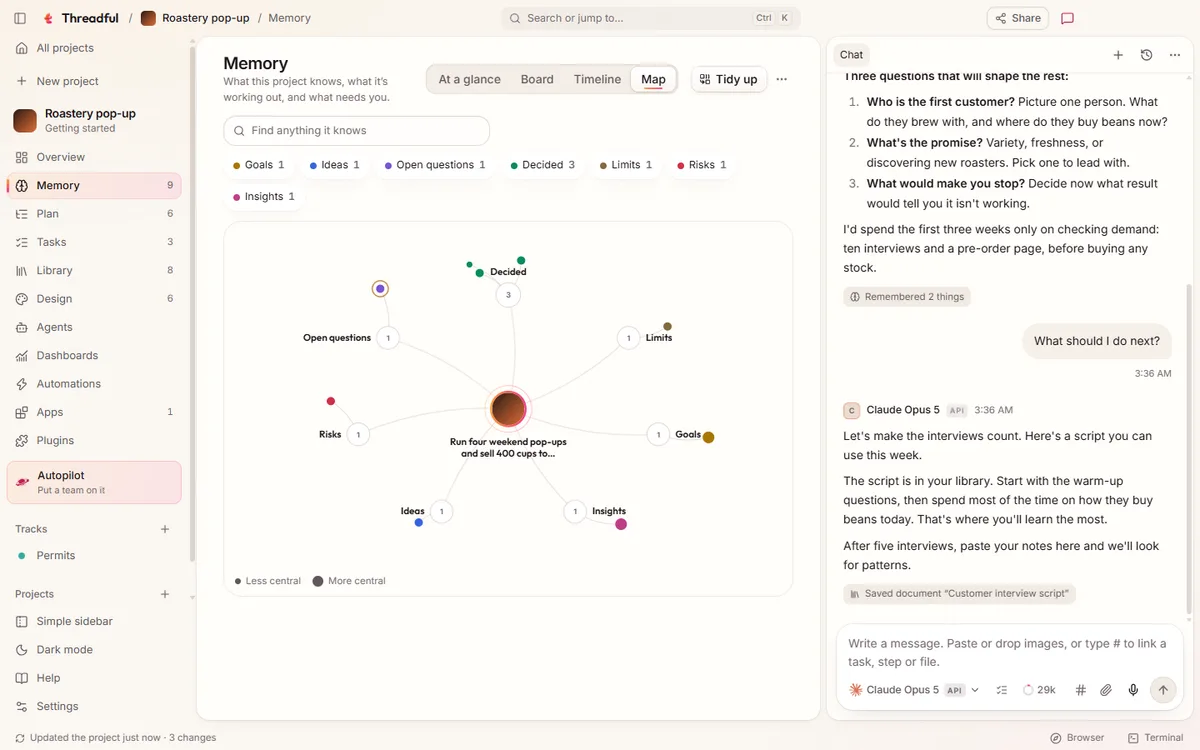
- The project sits in the middle: its icon (or its first letter, until it has one), with the goal under it.
- Around it are the plan steps and tasks most of memory is about, each with how many things are about it. When little in memory is tied to the plan yet, the hubs are the kinds instead: Decided, Facts and so on.
- Every item is a dot by the hub it's most about, coloured by its kind and bigger the more central it is. Open questions have a ring.
- Dots on the outside aren't tied to the plan yet. N not tied to the plan, at the bottom, picks them out.
Finding your way around
- Point at a dot to see it in a few words.
- Click a hub to see what rests on it: everything else fades, and a card says how many of each kind there are, lists the most central ones, and opens the plan step or task. Click it again, or Close, to go back.
- Click a dot to open its panel (see An item's panel). The lines to it light up, and dashed lines show what it's linked to.
- Zoom in where it's crowded: hold Ctrl and turn the wheel (or pinch) over the spot, double-click it, or use + and − at the top right of the map (or the + and − keys). Drag to move around while zoomed, and Show it all (or 0) goes back to the whole map. A dot you open from elsewhere that's out of view comes into view.
- Find anything it knows, above the map, fades everything that doesn't match your words, and the chips beside it fade or bring back each kind. The Map remembers what you chose.
- Beside the map, while nothing is open, In short and Needs you show where things stand and the open questions.
How to add an idea
Press Ctrl Shift A anywhere and choose Idea, or right-click selected words for Save as an idea, or add one on the Board. Or just mention it in the chat: memory updates in the background. When memory is empty, Add an idea starts it.
How to link two items
Open one, type in Link to something else in memory… and click the match.
Keeping it tidy
As memory grows, repeated ideas get merged in the background, keeping every link. Tidy up at the top of Memory does it now. Ideas left on their own for three weeks show on the Overview under Worth a look, with Make it a task or Talk it through.
Related
- Memory: At a glance, the Board and the Timeline.
- The Overview: the Map tab shows a small picture of the map.
Every page of the guide
The same guide is in the app: open Help or press F1. Something missing or unclear? Write to hello@threadful.ai.
