
On this page
The chat, your agents and Autopilot search the web when they need something recent or outside what they know, then read the most useful pages. Web search is a plugin: switch it on or off for a project in Settings → Plugins.
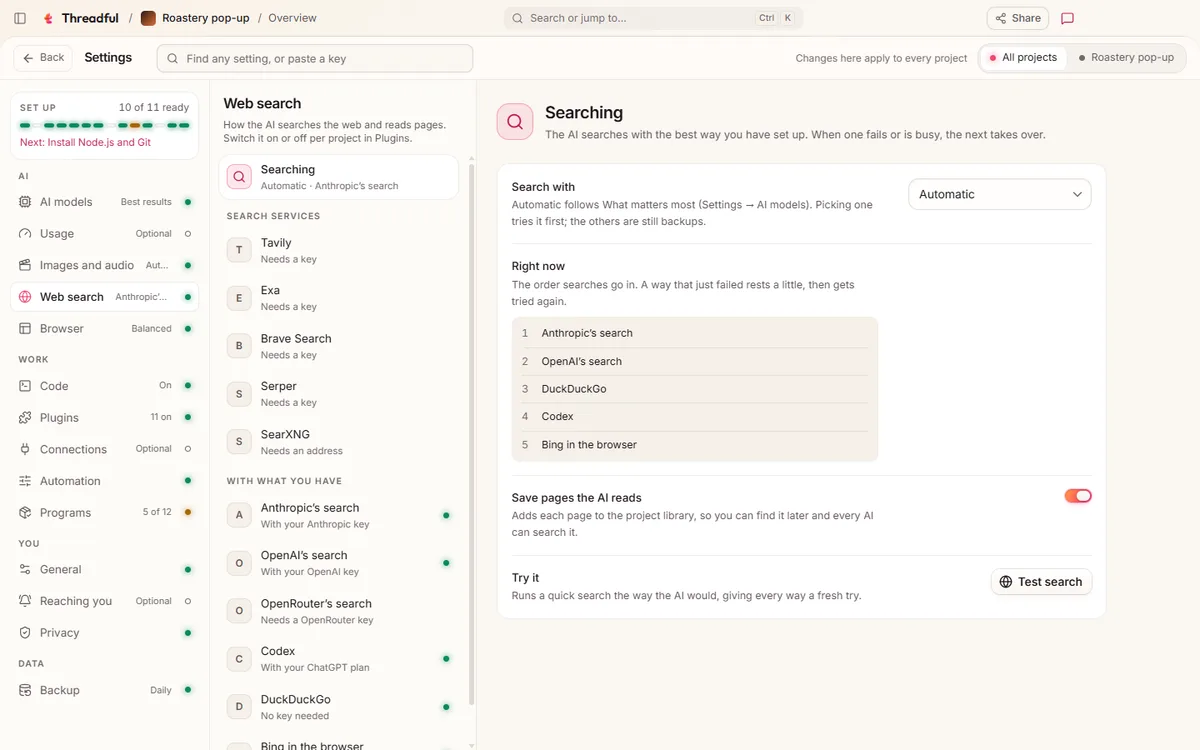
Ways to search
Threadful can search in several ways, and uses every one you have set up:
- Search services with a key of their own: Tavily, Exa, Brave Search and Serper, each with free searches to start, or SearXNG, your own search server. Get a key opens the service's page here; once you've made a key and it shows on the page, a banner offers to save it.
- With what you have: Threadful search, with your Threadful credits (a credit, a cent, a search, from your account or the free start on this computer; no key needed), the search that comes with an Anthropic, OpenAI or OpenRouter key saved in Settings → AI models (charged to that key: about $10 per 1,000 searches for Anthropic and OpenAI, about $7 for OpenRouter), Codex with your ChatGPT plan (slower, with no charge per search), and two free ones: DuckDuckGo, and Bing's results page read in a hidden window. Threadful search is listed when your copy has accounts; it waits while there are no credits to use, and when they run out it says so and the next way searches (see Plans and your account for buying more).
Each one's page in Settings → Web search says what it needs and has Use for searching to switch it off.
Which one it uses
Search with, under Settings → Web search → Searching, is Automatic unless you pick one. Automatic follows What matters most in Settings → AI models (what it says for the chat): Best results puts the best way first, Good value the cheapest that's nearly as good, and Lowest cost the free ones first. Picking a way (or Try it first on its page) tries it first; the others are still backups. With Only use models on this computer on, it doesn't search through AI services or Threadful credits, and an Autopilot team on Plans only never searches with anything billed per search.
Right now lists the order searches go in, which way answered last, and any way that's resting.
When a way stops working
When a way is busy, out of credit, limiting searches or not answering, the next one answers instead, and a notice says so once, with Settings to fix it: "Brave Search is out of credit. Searching with Anthropic's search for now."
The way that failed rests for a while, then gets tried again: a minute when it was busy, ten minutes when it was limiting searches, and half an hour when its key or credit needs you. Saving a key, or Test search, gives every way a fresh try.
If no way can search, the AI says it couldn't search and answers from what it knows. A card under its reply says what went wrong with each way and offers the quickest fix: switching on a better way you've switched off, or setting up a search service. The Overview's Needs you says so too, until search works again.
Needs you also suggests making searching reliable when only free search is set up and the project leans on the web: an Autopilot team at work, or the AI searching often.
The same search within an hour gets the same results without searching again, and one reply makes 40 searches at most.
Keeping search reliable
Free search limits how often it answers when the AI searches a lot. With only free ways set up, the Web search light is amber and Searching offers Make searching reliable: a search service's key, an Anthropic or OpenAI key, or Threadful credits turn it green.
Test search runs a search the way the AI would and says which way answered.
Pages the AI reads
The AI reads a page with a plain request first. When a site turns that away (many only let browsers in), or sends a page whose words only appear once its scripts run, Threadful reads it the way a browser shows it, in a hidden window that keeps nothing. Sites that ask a person to prove they're human, or keep out anything automated, can't be read that way: the AI says so and tries another source, uses a page in the browser (where you can take over), or asks you to open the page and share it with it (see Browser).
When the AI only needs one thing from a long page, a quicker model reads the page for it and passes on just what answers it, and the whole page is still there to read.
Pages are kept for a quarter of an hour, so reading a long page in parts, or the same page twice, doesn't fetch it again. Threadful asks a site for at most two pages at a time, and waits when a site asks it to. When a data source follows a site's next pages or links, it reads only the pages the site's robots.txt allows.
Save pages the AI reads adds each page the AI reads to the project's library, so you can find it later and every AI can search it. To search the web yourself, press Ctrl Shift F (see Chat).
Related
- AI models and keys: keys whose search Threadful can use, and What matters most.
- Connections and plugins: switching Web search on or off for a project.
- Browser: agents using websites the way you would.
Every page of the guide
The same guide is in the app: open Help or press F1. Something missing or unclear? Write to hello@threadful.ai.
