
On this page
Memory is what the project knows and is working out, shared by every AI you use here, whichever model and whichever chat. It fills in as you talk, from Autopilot, agents and coding apps, and you can change anything. Open Memory in the sidebar (Ctrl 7).
Everything in it is one kind of thing, an item: an idea, an open question, a decision, a limit or preference, a risk, an insight, a fact or a goal. Items link to each other, to plan steps and to tasks.
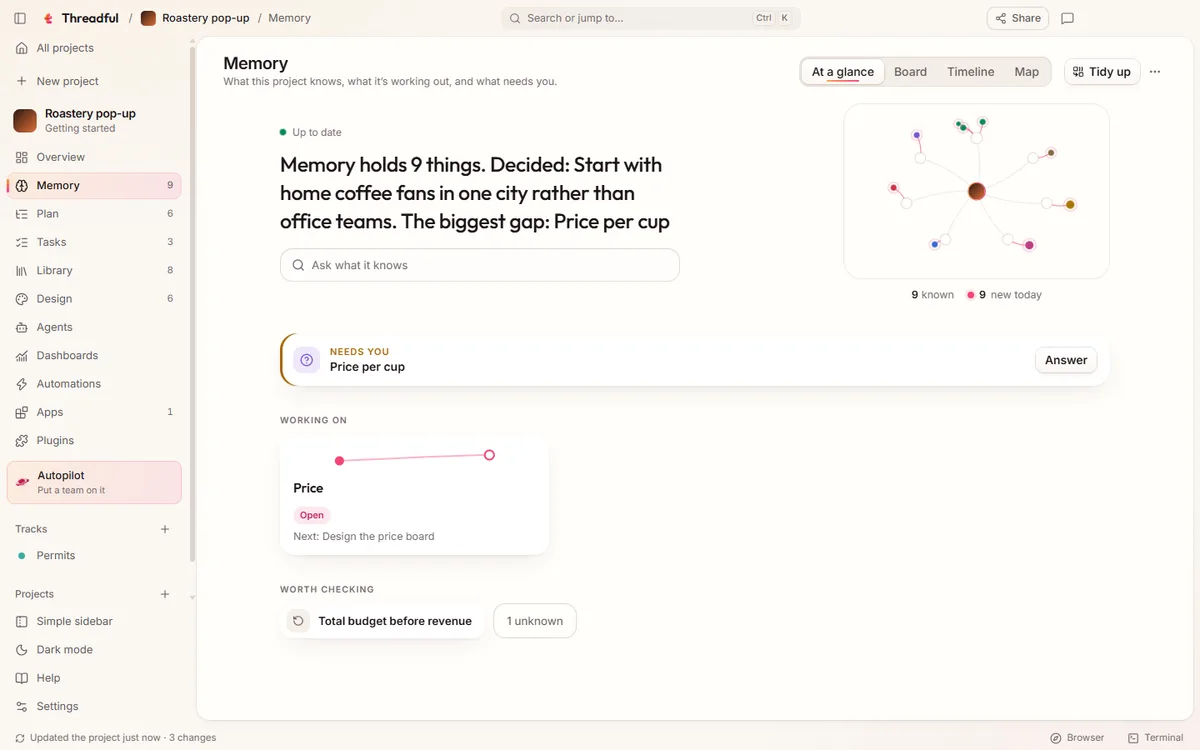
At a glance
Memory opens on At a glance: a few words for everything, and pictures instead of paragraphs.
- Where things stand, in one sentence, with Ask what it knows under it. Type a question ("What did we decide about pricing?"): the answer says what it came from, and clicking one opens it.
- The small Map beside it: everything memory holds around the goal, with what's new glowing. Click a glowing dot to open it, or anywhere else to open the Map. Under it: how many things it knows, and how many are new today.
- Needs you: the open question that matters most, with Answer. The rest open under it.
- Working on: a card for each thing the project is working out, with its steps as beads on a strand, whether it's Settled or still Weighing, and what's next.
- Worth checking: a chip for each thing that doesn't add up, for something said a while ago that's worth checking again, and for the unknowns.
Click a card or a chip to open it below; one thing opens at a time, and clicking it again closes it. Each item is shown in a few words the AI writes for it; its full words are in its panel.
It's read again by itself as memory changes. … → Read it all again now does it straight away. Without an AI model set up (Settings → AI models), the sentence comes from the chat so far and Needs you still shows; the cards and chips need a model.
A topic's path
Open a card under Working on to see how it got here: a bead for each step, the decision ticked, an open ring where it's stuck, and what's next at the end, with Open the task. When a topic has no next step, Suggest a next step adds one to the task list. Answer it settles its open question; Talk it through starts on it in the chat.
How to settle an open question
- Under Needs you, click Answer beside the question.
- An answer the project already has shows first, if there is one. Click it to use it, or type your own.
- Press Settle it.
The answer is kept as a decision, the question is marked answered, its topic is settled, and its next step goes on the task list. The note that follows has Undo, which takes all of it back.
When something doesn't add up
Click its chip under Worth checking. You'll see it as a picture where one fits: a figure on a bar against the line it should reach (a margin under its floor, two costs for the same thing), or the pieces of something with the ones not right yet in red. Otherwise the two sides, in a few words each.
- Two things disagree: use the newer one (memory changes to it and keeps the old one as history), Keep what memory says, or Make a task to look into it.
- A decision isn't being kept: Make a task, or It's in hand.
- Either way, Ask in the chat puts the question in the message box, so the AI can sort it out and change whatever still says the other thing (the plan, a task or a document too).
Each has Undo.
The chat knows them too: when what you ask touches one (the same costs, the same price, the same plan), the reply says so in a sentence, like "You set $10k; this plan costs $14k", and then answers. What Worth a look found on the Overview comes up the same way. One you've put away doesn't.
Worth checking again
Something said a while ago that what's happening now bears on, like a budget once spending starts. Still true keeps it and won't ask again for a month. Change it opens it to edit. Not now brings it back in a week.
The unknowns
What the project rests on but doesn't know yet, each with five dots for how much is known so far. Make it a question puts one under Needs you.
The Board, the Timeline and the Map
Above them, Find anything it knows narrows each to your words, and a chip per kind (with how many there are) shows or hides that kind; the Map keeps its own choice of kinds. Beside them, while nothing is open, In short says where things stand and Needs you lists the open questions: click one to open it.
The Board
Board shows a column per kind: Ideas, Open questions, Decided, Limits and preferences, Risks, Insights and Facts (and Goals when there are any). Each card is the item in a few words, with how many things it's linked to, where it came from and when. Open questions say Needs you; Show N answered brings back the answered ones.
- Add an idea at the top jots one down, with notes and pictures (see Quick add and notes).
- Add … at the foot of a column adds one of that kind.
The Timeline
Timeline lists what memory learned each day, newest first, and how: "decided in the chat", "added by you", "spotted by Head of Growth in Autopilot". A decision that changed says changed its mind, with what it was before.
The Map
Map lays memory out around the goal: see Map.
An item's panel
Click any item, in any view, to open it at the side:
- Its kind (click another to change it), the few words it's shown by (click to change them), its full words and its notes, which save by themselves.
- How central is this?: five steps.
- Changed once (or N times): what it was before.
- Linked to: what it's linked to, with what each link means. Link to something else in memory… adds one; × removes one.
- Also about this: the tasks and plan steps it's about.
- Related: what else names it, and close matches under "Might be related".
- Where it came from, and when.
At the bottom: Answer it for an open question, or Make it a task; Talk it through in the chat; Pin (the AI always sees pinned items, however much memory holds); Forget, with Undo in the note that follows. Esc closes the panel.
How to add something
- On the Board, under a column.
- Press Ctrl Shift A anywhere and choose Idea.
- Say it in the chat, like "Remember that the budget is 5,000": it lands here after the reply.
- Select words anywhere (a line of a reply, say), right-click and choose Remember this: they're kept as they are, pinned, so every reply has them.
Tidy up
Tidy up merges repeated items, keeping every detail and every link in the one they're merged into. Exact repeats are merged straight away; likely repeats need an AI model. It also runs by itself as memory grows, while Settings → Automation → Keep the project up to date is on.
The chat so far
When a chat gets long, older messages are summarized so replies stay quick. Nothing is lost: they stay searchable, and the AI can look them up. … → The chat so far shows the summary, how many messages it covers, Edit and Summarise older messages now. Settings → Automation → Recent messages kept word for word sets how much stays word for word.
Related
- Map: memory laid out by how things connect.
- The Overview: open questions, what's decided and the map at a glance.
- Sharing: hand memory to another AI or a person.
Every page of the guide
The same guide is in the app: open Help or press F1. Something missing or unclear? Write to hello@threadful.ai.
